Draftable for Legal Teams

Trusted legal
solutions.
Built with lawyers.

Draftable delivers trusted legal solutions for legal teams. Built with the legal profession and powered by proprietary technology, our accurate, easy-to-use solutions integrate effortlessly with the tools lawyers use, so they can confidently move ahead.

Draftable Compare pricing starts from
$249 USD per user/year.
Talk to the team for volume based discounts.

Compare plans & pricing
Tursted by 1,300 law firms and legal teams globally.

"Draftable Legal has exceeded our expectations in every way. The high-quality software and features have made it an indispensable tool for our team."

Bill Tanner,
Chief 
Information Officer
Allens

Fast, accurate comparisons.
Every time.

Lorem ipsum dolor sit amet, consectetur adipiscing elit. Suspendisse varius enim in eros elementum tristique. Duis cursus, mi quis viverra ornare, eros dolor interdum nulla, ut commodo diam libero vitae erat. Aenean faucibus nibh et justo cursus id rutrum lorem imperdiet. Nunc ut sem vitae risus tristique posuere.

Enterprise-grade
security

Draftable is ISO 27001:2022 certified and SOC 2 and GDPR compliant. For desktop users, your documents never leave your computer and comparisons are performed locally. Our team can't see what you compare. For cloud and API users, all data is encrypted in transit and at rest, and you stay in full control of your documents at every stage.

Built with lawyers
for lawyers

Minimal setup. No lengthy training. And whenever you need a hand, we're here around the clock with a 97% customer satisfaction rating.

Track changes
directly in email.

Compare and track changes in email messages, right in your inbox. Built in partnership with Allens, Redline in email is our most popular feature.

Built for your workflow. And the tools you use.

Our solutions integrate with Microsoft Office (including Outlook and Sharepoint), PDF, iManage, NetDocuments and more.

FAQs

What is Draftable?

Draftable is a tool that helps you to compare any two texts or documents online. It highlights (redlines) all differences between the two files so you can find changes quickly. Click here to see a sample comparison.

What types of documents can I compare?

Using our online diff checker software, you can compare any two PDF files, Word documents, Excel spreadsheets, PowerPoint presentations and plain text.

You can even compare a PDF file with a Word document, side-by-side. Draftable will redline all deletions and highlight all new changes.

Is there a way to compare free text online?

Absolutely! Draftable's Online Tool includes a new feature to compare two free text entries online. This is ideal for quick documents comparisons without needing to sign up.

Why should I use Draftable over a free online comparison tool?

Compare to online widget Draftable's comparison software offers enhanced security and functionality over online services. By processing documents locally, it ensures sensitive information remains private and secure. Additionally, its intuitive interface supports a wide range of file formats, providing a comprehensive and user-friendly comparison experience. Try online text diff checker here

Can I compare documents offline?

Draftable offers enterprise-grade solutions as well as a free online comparison tool. We have three options:

  • Online tool.
    A free, web-based comparison tool that requires no signup. Perfect for quick Word, PDF, and other files comparisons on the go.
  • Desktop Version.
    Supports offline file comparisons, including Plain Text, Rich Text, Word, PowerPoint, and Excel files. This version is ideal for privacy-conscious users who need offline access. After a free trial, licenses can be purchased for teams. Learn more here.
    The desktop software is available in two versions: Draftable (best for large organisations) and Draftable Legal (best for law firms and legal teams).
  • Enterprise solutions.
    This includes on-premise options such as desktop software and a diff checker REST API, providing robust privacy and customisation. Read more here. Contact us here.
Why do I need it to compare documents in Word - I can use the Microsoft Word Compare function?
  • Broader file compatibility.
    Draftable has a broader file compatibility than Word Compare, supporting a wide range of file formats for comparison. Both Draftable and Draftable Legal can handle Word documents, PDFs (including scanned documents), PowerPoint presentations, and Excel spreadsheets, without the need to convert them into Word format first.
  • Greater accuracy.
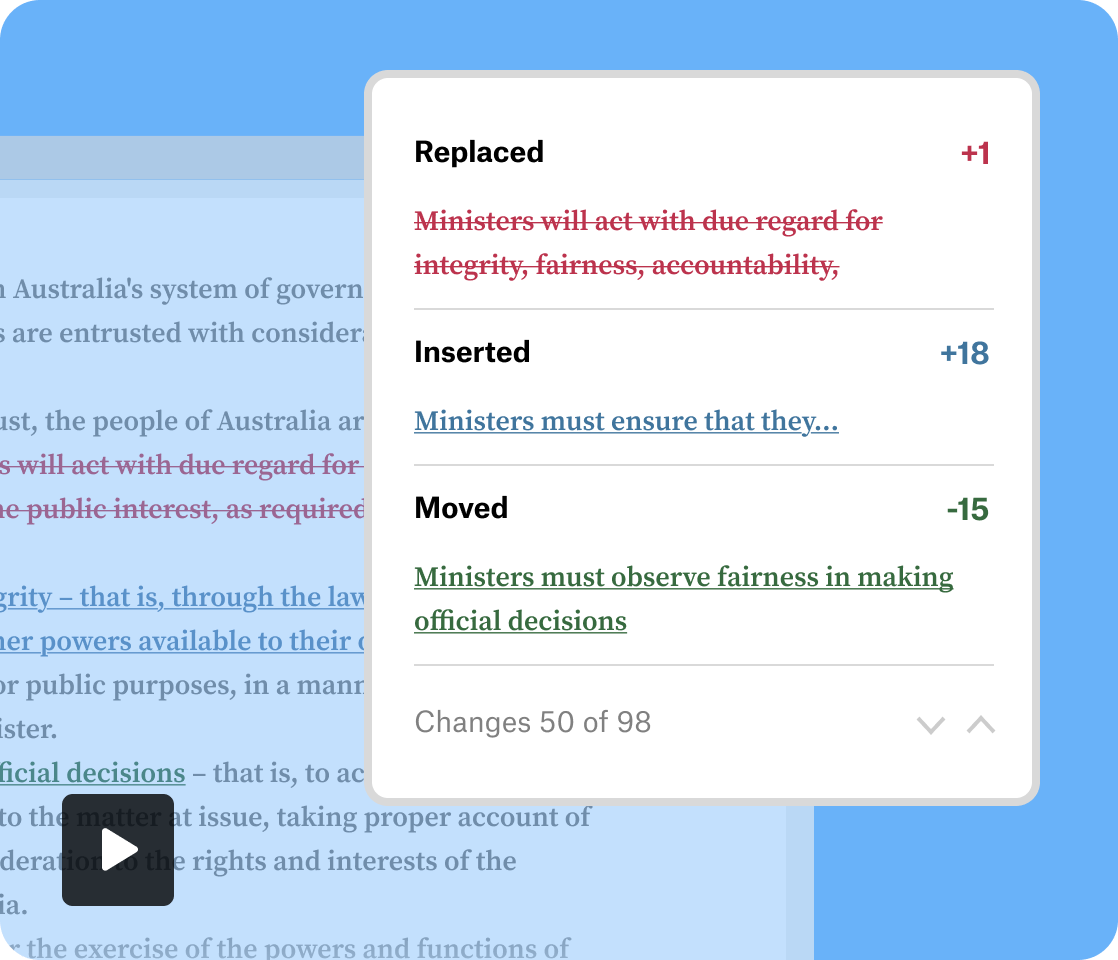
    If you’re using Draftable Legal, you'll get greater accuracy over Word Compare, by detecting changes at a more detailed character level in addition to word-level changes.  Unlike MS Word, it also identifies text that has been moved and edited.
  • Greater workflow efficiency.
    You’ll also get greater workflow efficiency when using Draftable Legal over Word Compare. Draftable Legal integrates seamlessly with essential software such as Word, Outlook, and Document Management Systems. These integrations reduce the number of clicks required to run a comparison. It speeds up subsequent tasks, like sending comparison results from Draftable with a single click.

Read more about the differences between Draftable and MS Word Compare here.

What is redline comparison?

Redline comparison tools display the differences between Word, PDF, PPT or text documents with distinct formatting and colours for deleted, inserted and moved text, so you can easily identify changes within a single document view.

Draftable offers different types of redline text comparison output including:

  • Word Redline with or without tracked changes
  • PDF Redline including changed pages only
  • Redline in Excel
  • Redline in PowerPoint
Why would I use text comparison?

Draftable offers document comparison software for large companies. It is designed to help you find small differences and highlight key changes quickly, in a side-by-side viewer. Other benefits include:  

  • Cost savings.
    Draftable shortens the process of finding changes down to just seconds, reducing the cost burden to your business.
  • Time savings.
    Get your day back – stop comparing documents manually.
  • Reduce embarrassing errors.
    Draftable helps your team stay on top of changes and look great in front of clients and colleagues.
Do I need a Microsoft 365 subscription to compare two Word documents with Draftable?

You don’t need a Microsoft 365 subscription to use Draftable Online or API. When using Draftable Desktop, you can compare text, Word, PowerPoint and Excel documents using Office 2007 or later (including 365 and non-365 versions).

To use the 'Export to Track Changes' feature on Draftable Desktop, you will need Office 2013 Pro Plus or later (including Office 365). See the full list of system requirements for Draftable Desktop here and for Draftable Legal here.

How do I find the differences between two Word documents?

Upload your Word files into the launcher, click Compare, and see the differences highlighted. Read more here.

What types of differences can Draftable detect and how does it display the differences between two Word documents?

Draftable can detect changes in document content, fonts (family size and colour), styling (e.g. bold, italics), and layout (alignment, indentation). It can also find differences in complex elements like tables, text boxes, hidden text, footnotes, and endnotes.

What about security?

Draftable takes security seriously. W are ISO 27001:2022 certified and SOC 2 and GDPR compliant. We specialise in document comparison for large organisations and can cater to teams who have obligations concerning privacy and security. We will gladly work with your IT or Dev teams to get you up and running quickly.

To discuss our self-hosted version or API, Contact Us. Read More About Security.

Why law firms love Draftable.

Join 1300+ legal teams using Draftable.
Get started for free.